Prerequisites
Permissions to View the alerts work page required.
Overview
Behavior Notices are displayed on the Alerts Work Page alongside AML alerts but are labeled as "BHV - Threshold" to distinguish them. Unlike AML alerts, Behavior Notices do not indicate a specific type of suspicious activity. Instead, they notify you when a player crosses a defined threshold—such as a percentage increase in play or a specific dollar amount. These notices are designed to help you review a player’s behavior, activity, and risk when there are significant volumes or changes in play. Behavior Notices are not risk scored, so they don't show a Confidence score.
You can use the Advanced Filter on the Alerts Work Page to view all Behavior Notices by filtering on the Alert Type field.
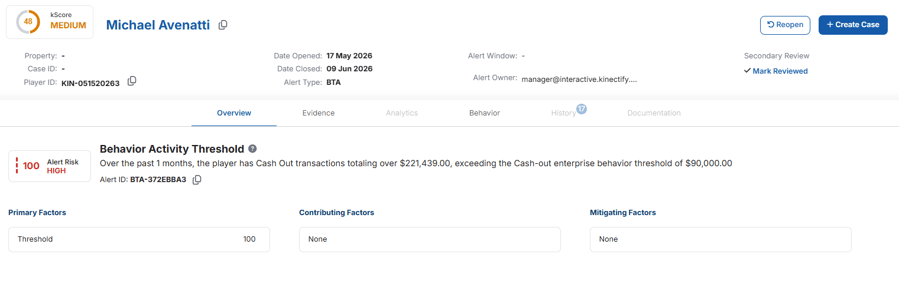
Behavior Notice Tabs
Overview Tab: Shows the notice's name, a description of the threshold the player crossed, the Alert ID, and the notice's Primary, Contributing and Mitigating Factors.
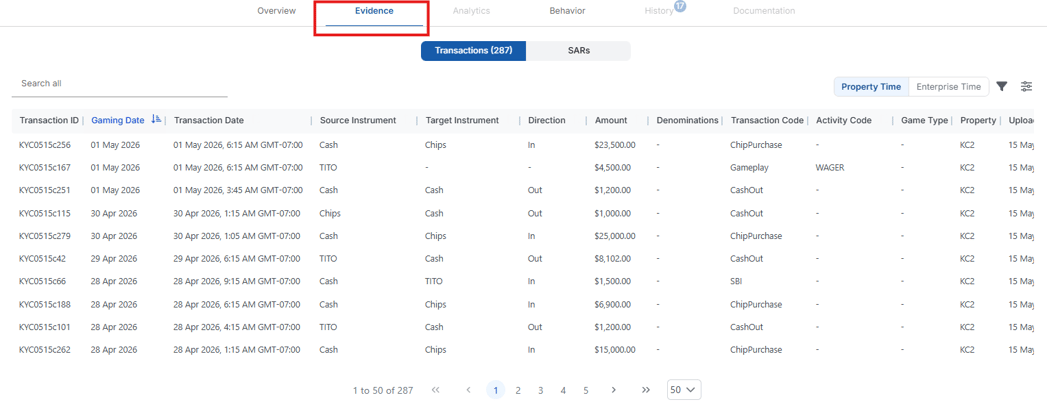
Evidence Tab: Lists all transactions included in the threshold alert. This often includes a large number of transactions across multiple casino properties. To review them properly, you must have access to all relevant properties.
Analytics Tab: Turned off for Behavior Notices. No analytics are available for them.
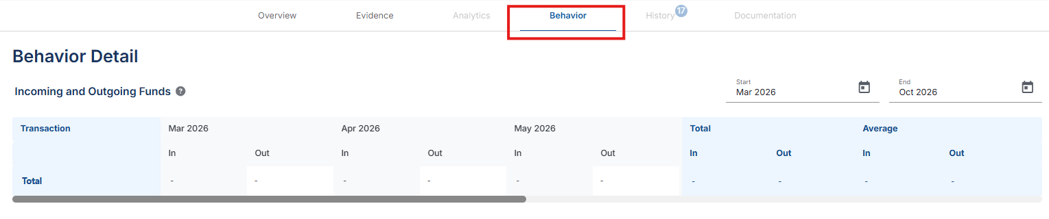
Behavior Tab: Displays a behavior table summarizing the player’s monthly activity, aggregated by instrument type.
History Tab: Shows the player's past alerts, cases, SARs and KYC reviews, as on other alerts.
Documentation Tab: Allows you to add notes and attachments to the alert.
Case Creation from Behavior Notices
When you create a case from a Behavior Notice, choose the Primary Property the case belongs to and any Secondary Properties if needed.