Prerequisites
Permissions to View/Edit Alert Settings required
Overview
The Settlement Period is the delay between when a transaction occurs and when it is evaluated by the alert engine for suspicious activity. This buffer allows time for corrections or adjustments in the client’s source systems before the data is used in alert generation. Most land-based casinos use a 10–15 day window to allow staff to adjust transactions and gameplay data. This helps reduce false positives in alerts caused by inaccurate data.
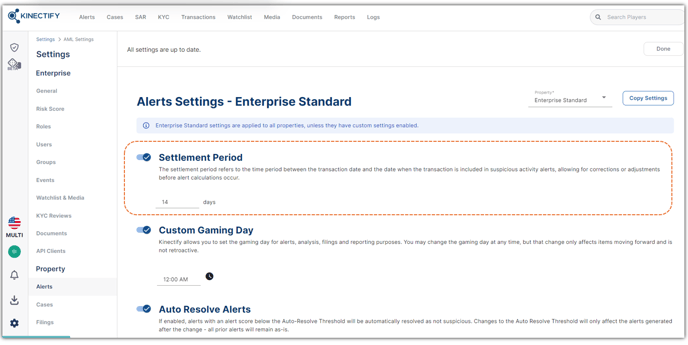
By default, Kinectify sets the settlement period to 14 days, but it can be customized.
Steps to Modify the Settlement Period
Go to Settings >Alerts, located under the property settings.
Locate the Settlement Period configuration at the top of the page.
Adjust the number of days as needed.
Click Save at the top of the page.
Enter a comment when prompted—this will be logged in the User Activity Log.
Expected Result
The new settlement period will be saved and logged with your comment in the User Activity Log. This change is not retroactive—it only applies to newly generated alerts going forward. Alerts will only include transactions that have passed the newly configured settlement period.