Prerequisites
Permissions to View the alerts work page required.
Overview
The History tab on the alerts work page allows you to review past alerts, cases, SARs and KYC reviews for the player. The purpose of the history tab is to display historical areas of risk to add color as you evaluate the alert.
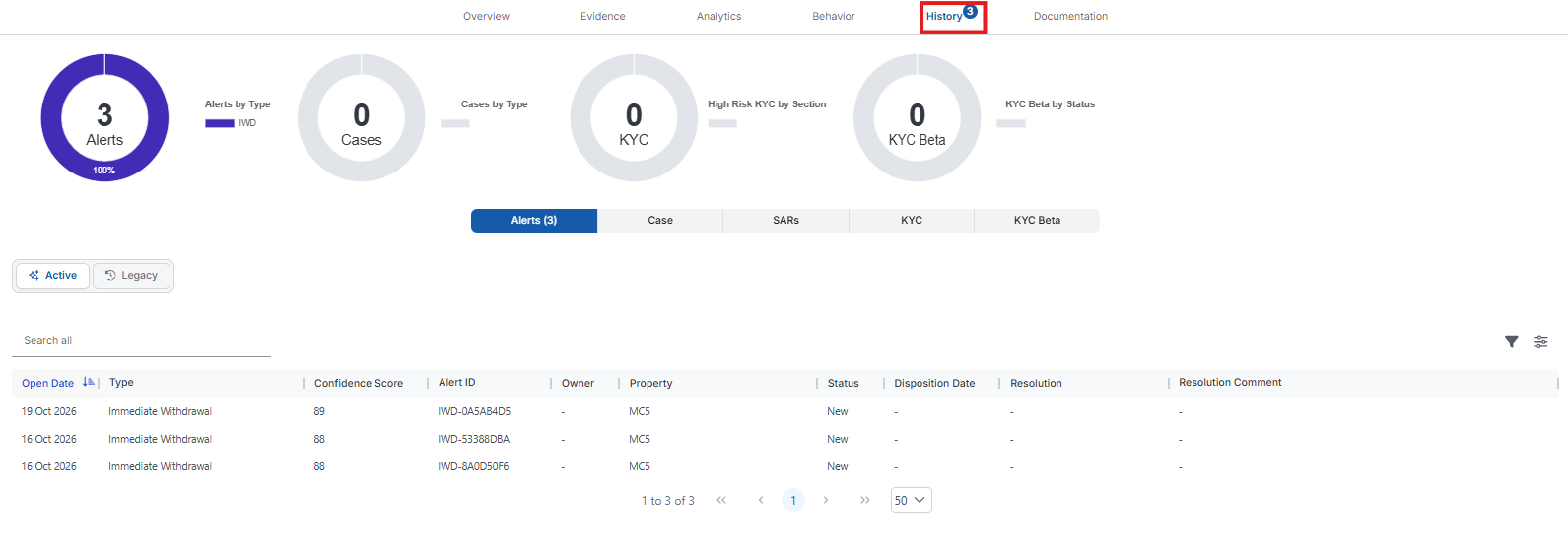
The donut charts across the top summarize the player's history:

Alerts – The player's alerts, broken down by alert type (Alerts by Type).
Cases – The cases linked to this alert, broken down by case type (Cases by Type). It appears only when Cases is turned on and you have permission to view cases.
KYC – The player's high-risk KYC findings, broken down by section (High Risk KYC by Section).
KYC Beta – The player's KYC Reviews (Beta), broken down by status (KYC Beta by Status). It appears only when KYC Reviews (Beta) is turned on.
Use the buttons below the donuts to switch between tables. Each button shows how many items it holds:

Alerts – The player's alerts, with the Open Date, Type, Confidence Score, Alert ID, Owner, Property, Status, Disposition Date, Resolution and Resolution Comment.
Case – The cases this alert is linked to. It appears only when Cases is turned on and you have permission to view cases.
SARs – The player's SARs. It appears only when SAR filing is turned on for the alert's property and you have permission to view SARs.
KYC – The player's KYC reviews.
KYC Beta – The player's KYC Reviews (Beta). It appears only when KYC Reviews (Beta) is turned on.
Clicking a row in the Alerts or KYC table opens that item in a new browser tab. Clicking a row in the Case table opens the case.

If your organization still has Legacy alerts, an Active | Legacy toggle appears above the Alerts table. Active is selected by default. Select Legacy to see the player's Legacy alerts, which show a Risk Score instead of a Confidence Score.