Prerequisites
Permissions to View/Edit Alerts Settings required
Overview
The Gaming Day is a custom 24-hour window set by each gaming organization. Unlike a standard calendar day that runs from midnight to midnight, the Gaming Day can start and end at any hour, depending on your operational needs. All transactions and gameplay data collected during this window are grouped together for analysis and reporting.
Steps to Customize the Gaming Day
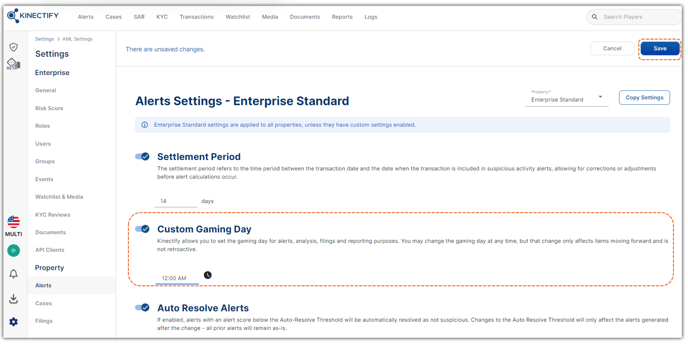
Go to Settings > Alerts.
Locate the Custom Gaming Day setting.
Adjust the start time to define your organization’s 24-hour Gaming Day window.
Click Save at the top of the page.
Enter a comment when prompted—this will be logged in the User Activity Log.
Expected Result
The new Gaming Day configuration will be applied to all future transactions and gameplay data. This change will affect how alerts, filings, and reports are grouped and analyzed going forward. The change is not retroactive—historical data will remain associated with the previously configured Gaming Day.