Prerequisites
-
Active alerts turned on for your organization.
-
Pattern qualification made available to your organization by Kinectify.
-
To change the settings: permission to edit alert settings in Settings > Alerts (Beta).
Pattern qualification includes:
-
A Pattern Qualification switch on the Alerts (Beta) settings page
-
Three settings for each alert type on the Escalation qualification tab
-
A Pattern Pending outcome for events that are still short of the pattern
-
One alert that brings together every qualifying event once the pattern is met
-
Pattern details on the alert, and in case and SAR narratives
How pattern qualification works
Kinectify reviews your players' activity for each alert type, such as Structuring Inbound or Minimal Play. When it finds activity that may need a closer look, it records it as an event and gives the event a Confidence Score from 1 to 100. The higher the score, the more likely the activity needs to be investigated.
You decide how high the score must be before an event can become an alert. This setting is called the Threshold score. To find it, go to Settings > Alerts (Beta), open the alert type's card (for example, Structuring Inbound) and select the Escalation qualification tab. For more on this setting, see What is the alert threshold?
Kinectify then decides what happens to each event:
-
The score is below the Threshold score — No alert is created. The event is recorded in Logs > Non-Escalated Events as Below Threshold.
-
The score meets the Threshold score, and pattern qualification is off — An alert is created.
-
The score meets the Threshold score, and pattern qualification is on — Kinectify looks back for similar events for the same player. An alert is created only if there are enough of them. If there aren't, the event is recorded as Pattern Pending.
If Deep Analysis is turned on, it makes a final check before an alert is created. See Deep Analysis and pattern qualification below.
What counts toward the pattern
When pattern qualification is on, Kinectify counts:
-
The event it's deciding on.
-
The same player's earlier events for the same alert type within the Evaluation period, for example the last 90 days, at any of your properties.
An earlier event counts even if its own score was below the Threshold score. Duplicate events aren't counted, and if the same transactions are detected twice, they count once.
If the count reaches the Minimum qualifying events you set, an alert is created.
Example
Structuring Inbound is set up with a Threshold score of 70, 3 minimum qualifying events and a 90-day evaluation period. A player has three structuring inbound events:
-
March 1 — The event scores 55. That's below 70, so no alert is created. The event is still recorded and can count later.
-
April 10 — The event scores 75, which meets 70. Counting the March 1 event, the player has 2 events in the last 90 days, short of 3. The event is recorded as Pattern Pending.
-
May 20 — The event scores 80, which meets 70. The player now has 3 events in the last 90 days, so an alert is created that includes all three events.
The evaluation period
The evaluation period counts back from the last day of the event's activity, and that day is included. An earlier event counts if any part of its activity falls inside the period.
Where to set it
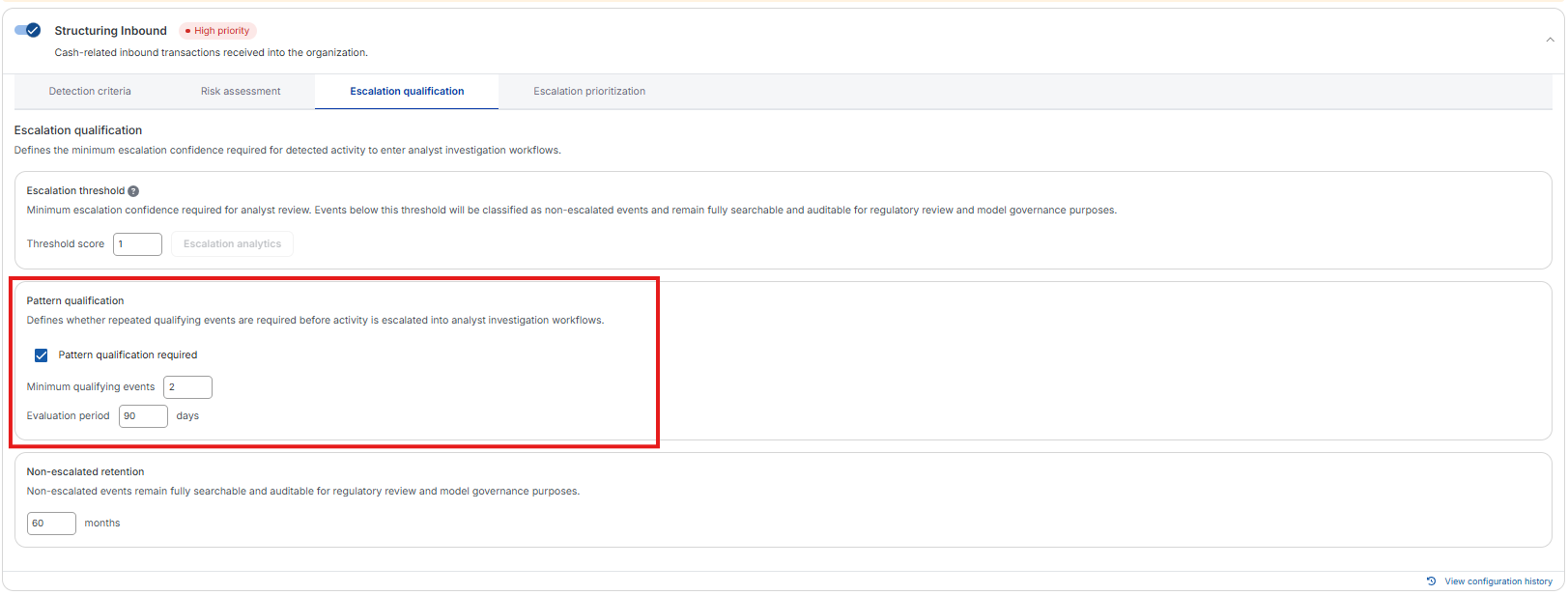
Pattern qualification is set for each alert type in Settings > Alerts (Beta). Open the alert type's card and select the Escalation qualification tab. The Pattern qualification section has three settings:
|
Setting |
What it does |
|---|---|
|
Pattern qualification required |
When checked, an alert needs the set number of qualifying events. When cleared, a single event that meets the threshold score becomes an alert. |
|
Minimum qualifying events |
How many qualifying events, including the current one, are needed before an alert is created. Enter at least 2. |
|
Evaluation period |
How many days back Kinectify looks for earlier qualifying events. |
You can set these values for Enterprise Standard or for a property with custom settings. A property that follows Enterprise Standard shows the enterprise's values and can't be changed on its own.
Turning pattern qualification on or off

Pattern qualification is turned on or off with the Pattern Qualification switch on the Alerts (Beta) settings page. Kinectify first makes it available to your organization. Until then, the Pattern qualification section doesn't appear on the Escalation qualification tab.
-
On — Alerts follow each alert type's pattern qualification settings, and you can edit them.
-
Off — Each event that meets the threshold score becomes an alert on its own. The pattern qualification settings are shown but can't be changed.
For some properties, a note shows whether pattern qualification applies to it, for example Pattern qualification is on for this property. or Pattern qualification follows the enterprise (on).
Events that are still short of the pattern
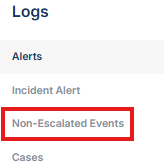
An event that meets the threshold but doesn't yet complete the pattern is not escalated. You'll find it in Logs > Non-Escalated Events with:
-
Outcome Type — Pattern Pending
-
Pattern Status — how far along the pattern is, for example 2 of 3 Events
-
Event outcome reason (on the Governance tab) — for example Risk score 82 meets escalation threshold 70, but only 2 pattern event(s) observed (3 required).
Events that don't need a pattern show Not Required as their Pattern Status, and events that completed one show Pattern Qualified.
When the pattern is met
The event that completes the pattern creates one alert. The alert includes every qualifying event, numbered in order, with the completing event last. The earlier events aren't changed. Each keeps its own outcome in the Non-Escalated Events log, for example Below Threshold or Pattern Pending.
Each later event that meets the threshold and still has enough qualifying events within its own evaluation period can create another alert.
If several events are detected at the same time and together complete the pattern, only one alert is created. The others are recorded as Pattern Pending with a reason that ends Another event with the same detection time carries this pattern, so this event is not promoted.
What you'll see on the alert
An alert created through pattern qualification shows the pattern on its tabs:
-
Overview — The alert summary states how many qualifying events led to the alert and the dates they cover, for example Player had 3 structuring inbound events ranging from … to … totaling over … from 01 Mar 2026 to 20 May 2026.
-
Evidence — Transactions from every qualifying event are listed. Use the Event filter (All, 1, 2, …) to see one event's transactions; each row shows Event N of M. You can mark one event's transactions as suspicious with Mark Event N Suspicious, which marks every other event's transactions as not suspicious.
-
Analytics — The tab opens with a Pattern matched header, a summary of the qualifying events (such as QUALIFYING EVENTS and AGGREGATE AMOUNT), and a chart with each qualifying event numbered inside the evaluation window.
Case and SAR narratives
When you create a case or SAR from one of these alerts, the narrative paragraph for that alert opens with the alert's pattern sentence, for example Player had 3 structuring inbound events….
Which alert types use it
Pattern qualification applies to:
-
Structuring Inbound
-
Structuring Outbound
-
Minimal Play
-
Walks with Chips
-
Unknown Chip Source
-
Dormant Funds
-
Immediate Withdrawal
Custom alerts start from a copy of the Structuring Outbound settings, so their Escalation qualification tab also has a Pattern qualification section.
It does not apply to Incident, High Risk Player or Behavior Notices, which have no escalation qualification settings.
Deep Analysis and pattern qualification
If Deep Analysis is on, it runs only after the pattern is met. If Deep Analysis decides the event doesn't warrant an alert, the event is recorded with the outcome Deep Analysis and its Pattern Status still shows Pattern Qualified.
Configuration History
Changes to Pattern qualification required, Minimum qualifying events and Evaluation period are recorded in the alert type's Configuration History.
What pattern qualification does not do
-
Does not require every event in the pattern to meet the Threshold score. The newest event must meet the Threshold score, or the pattern isn't checked at all. Earlier events count toward the pattern whatever their score.
-
Does not limit the pattern to one property. Qualifying events from all of the player's properties count.
-
Does not count duplicates. Duplicate events and repeat detections of the same transactions are not counted again.
-
Does not stop later alerts. A later event that completes the pattern again can create another alert.
Related Articles
-
What is the alert threshold?
-
What happens to events below the escalation threshold?
-
What is the deduping alert logic in Kinectify?
-
What is the Confidence Score on an Alert?