Prerequisites
Permissions to View the alerts work page required.
Overview
Immediate withdrawal refers to situations where a player withdraws funds shortly after depositing them. This tab helps identify and assess such behavior by summarizing key financial and gameplay metrics.
If pattern qualification is not configured, the tab shows the alert window's dates at the top, followed by six cards that summarize the player's activity:
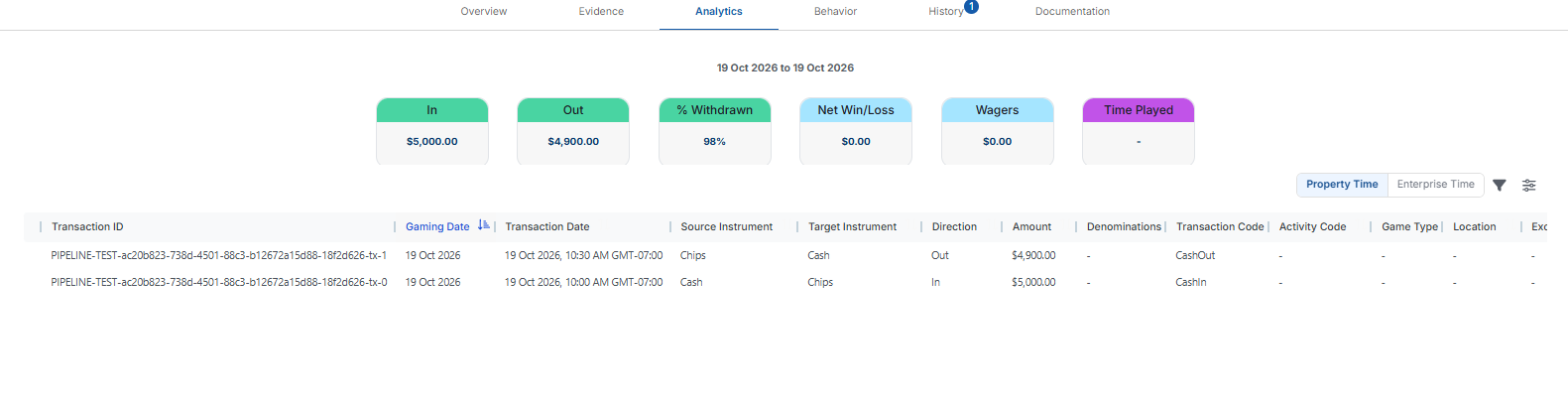
In – The total value of deposits made during the alert window.
Out – The total value of withdrawals made shortly after the deposits.
% Withdrawn – The percentage of deposited funds that were withdrawn, helping highlight suspicious or high-risk behavior.
Net Win/Loss – The player's wins minus losses during the alert window.
Wagers – The sum of all wagers placed, which can indicate whether the player engaged in gameplay before withdrawing.
Time Played – The total time spent playing, in minutes, useful for evaluating whether the player played meaningfully or simply withdrew funds quickly.
Below the cards is a transactions table that lists the individual transactions contributing to the totals above. This allows you to investigate the specific deposit, withdrawal, and gameplay events tied to the alert.

Pattern matched view
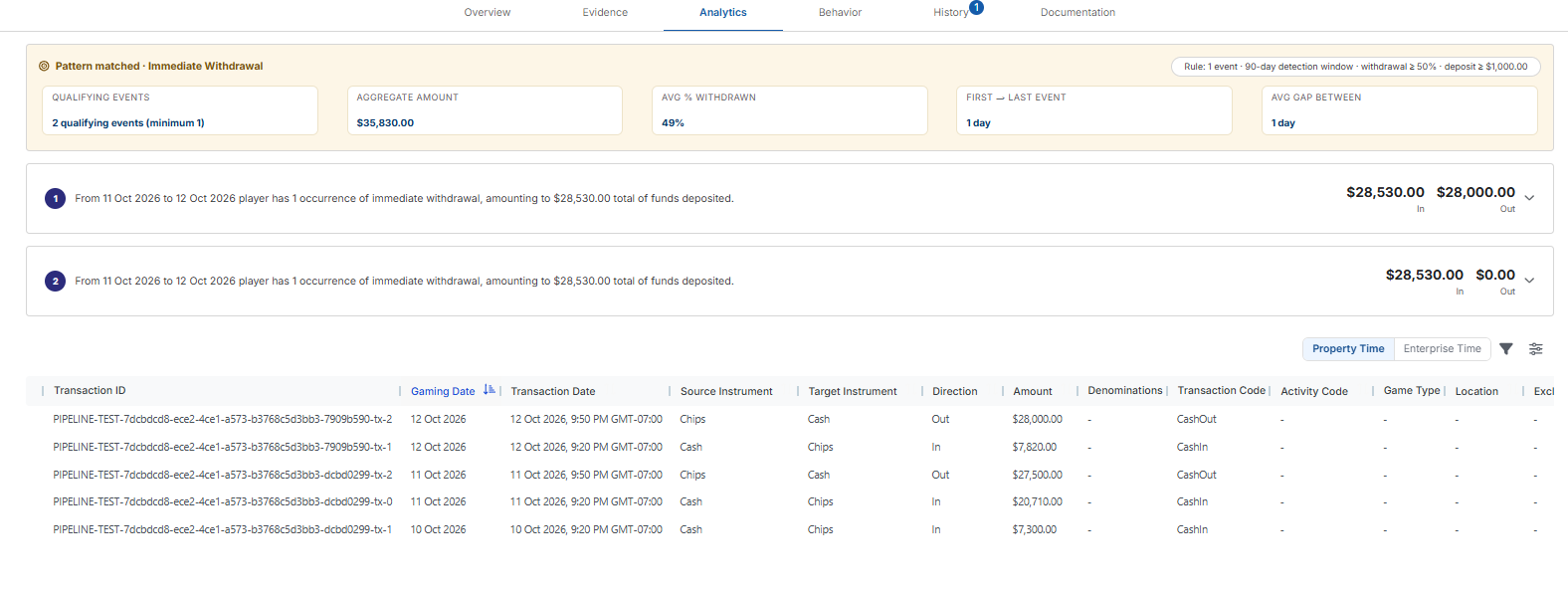
If pattern qualification is configured for your property, the tab opens with a Pattern matched · Immediate Withdrawal banner. The pill on the right shows the rule that was met, for example 1 event · 90-day detection window · withdrawal ≥ 50% · deposit ≥ $1,000.00. The banner's summary cards show:

Qualifying Events – How many qualifying events were found, compared with how many your settings require. For example, 2 qualifying events (minimum 1).
Aggregate Amount – The total deposits across all qualifying events.
Avg % Withdrawn – The average percentage withdrawn across the qualifying events.
First → Last Event – The number of days from the start of the first qualifying event to the end of the last one.
Avg Gap Between – The average number of days between the end of one qualifying event and the start of the next. It appears only when there are two or more events.
Below the banner, each qualifying event has its own numbered row. The row reads, for example, From 11 Oct 2026 to 12 Oct 2026 player has 1 occurrence of immediate withdrawal, amounting to $28,530.00 total of funds deposited, and shows the event's In and Out amounts on the right, for example $28,530.00 In and $28,000.00 Out.
Click a row to expand it. The expanded row shows the event's:


In – The total of the player's deposits during the event's dates.
Out – The total of the withdrawals that make up this event. Each withdrawal counts toward only one event, so when two events cover the same days, a later event can show $0.00.
% Withdrawn – Out as a percentage of In.
Net Win/Loss – The player's wins minus losses during the event's dates.
Wagers – The total amount wagered during the event's dates.
Time Played – The total time spent playing during the event's dates, in minutes.
A dash (-) on Net Win/Loss, Wagers or Time Played means no gaming activity was recorded during the event's dates.