Prerequisites
Permissions to View/Edit Alerts Settings required
Overview
Resolution Reasons are customizable templates that analysts can use when adding dispositions to alerts. Instead of copying and pasting from external documents or notes, users can select from preconfigured resolution text directly within the alert workflow. These templates can be edited as needed, giving analysts flexibility to tailor the resolution note to the specific situation while maintaining consistency across the team.
Steps to Edit or Create New Resolution Reasons
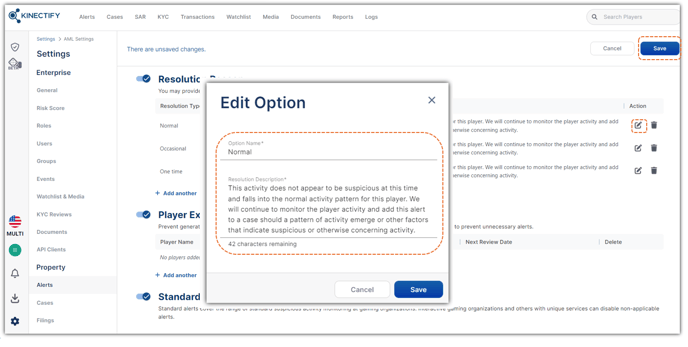
Go to Settings > Alerts.
Scroll to the Resolution Reasons section.
To edit or delete an existing template, click the Edit
 or Delete
 icon next to it.
To add a new reason, click Add Another.
In the modal that appears, enter:
A Name for the resolution reason.
A Resolution Comment that will be used as the default note.
Click Save.
 Expected Result
After saving, the new or updated resolution reasons will be available to all users when resolving alerts. These templates streamline the alert resolution process and ensure consistent documentation across the team.
Once configured, users can access these resolution reasons by clicking the Resolve button on the Alerts Work Page. A modal will appear showing the list of available resolution reasons and the associated notes from the settings page.
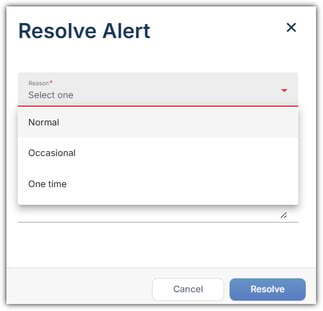
The resolution comment can be used as-is or edited by the analyst to add more context. This provides a balance between efficiency and flexibility in documenting alert decisions.