Prerequisites
-
Active alerts turned on for your organization by Kinectify.
The Active | Legacy toggle
When your organization has both versions, the toggle appears on:

-
The Alerts page
-
The analyst and manager dashboards
-
The Alerts and Incident Alert logs
-
A player profile's Alerts tab
-
An alert's History tab, under Alerts
-
The panel for adding alerts to a case
-
The step for adding associated alerts when you add transactions to a case or SAR
The Alert Trends page has no toggle. It includes both Active and Legacy alerts.
How Active and Legacy alerts differ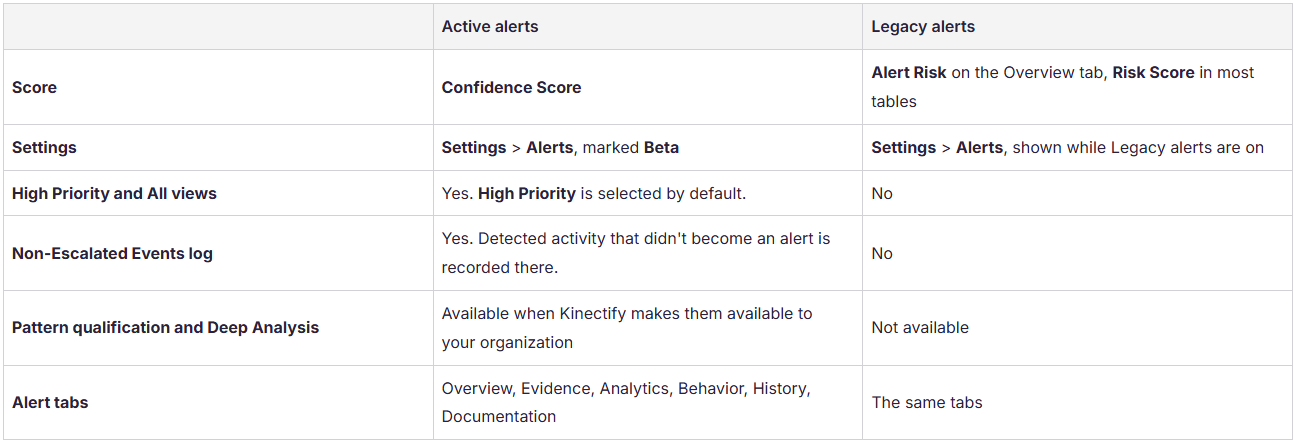
Related Articles
-
What are suspicious activity alerts?
-
How the Alerts Work Page Is Set Up
-
What is the Confidence Score on an Alert?
-
What happens to events below the escalation threshold?