Prerequisites
Permissions to View/Edit Alerts Settings required
Overview
The WWC alert is designed to detect players who leave the gaming floor with a significant chip balance, which may indicate suspicious behavior. You configure the alert by setting a chip balance threshold and enabling contributing and mitigating factors. This allows the system to replicate what analysts already do—identify patterns, validate risk, and apply mitigating context.
For Active Alerts
If Active alerts are turned on for your organization, this alert is set up in Settings > Alerts (Beta). Choose the property at the top of the page, then open the Walks with Chips (WWC) card. The card has four tabs:
Detection criteria – The Detection window (the standard number of days, or a Custom window), the WWC threshold and the Daily chip balance threshold. Activity that meets these is recorded as an event.
Risk assessment – The Contributing risk factors and the mitigating Redeemed percentage of chip inventory, each with a weight, plus an optional Alert analytic threshold (the Daily Walk Threshold) that sets a benchmark on the Daily Walk chart. Together they adjust the event's Confidence Score from its fixed base.
Escalation qualification – The Threshold score an event's Confidence Score must reach to become an alert. If pattern qualification is available for your property, you can also require a Minimum qualifying events count within an Evaluation period before an alert is produced.
Escalation prioritization – The High priority threshold. Alerts at or above this Confidence Score are marked High Priority.
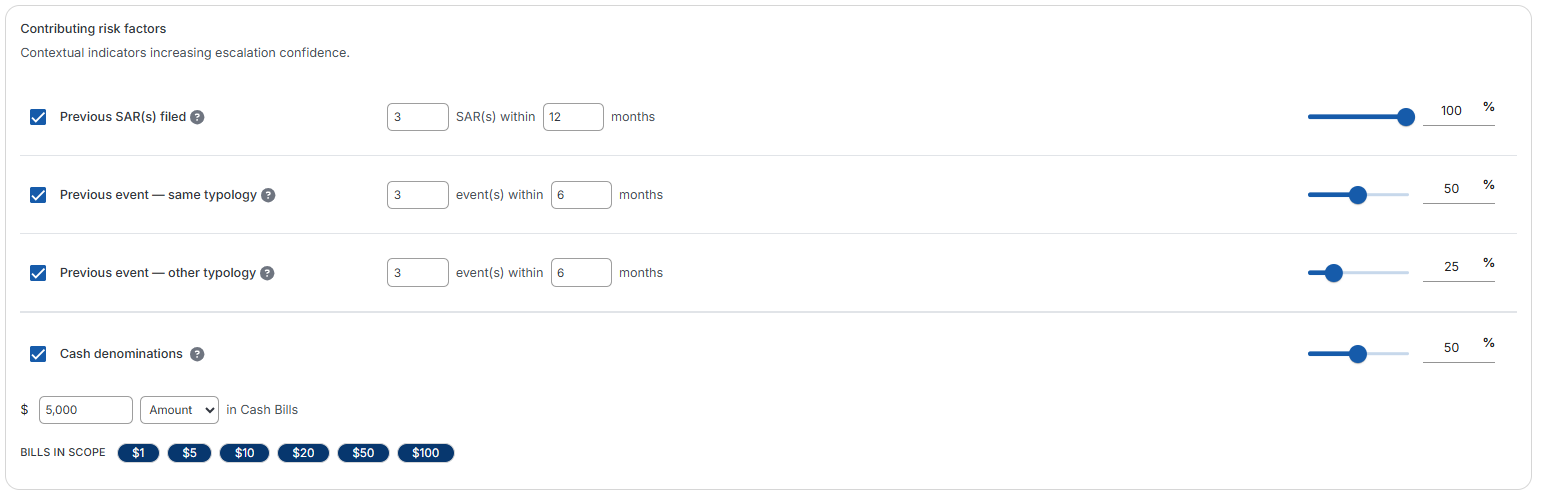
On Active alerts, this alert type can include the Cash Denominations contributing factor. It looks for cash transactions in the bill denominations set in your alert settings. For details, see the contributing factors article.
Steps to Configure the WWC Alert
Access the Alert Settings Page
Click the gear icon in the bottom-left navigation bar.
Select the AML module, then click Alerts (Beta) in the left-hand menu.
Choose the property at the top of the page, then open the Walks with Chips (WWC) card.

Set the Detection Window
The detection window defines how far back the system looks for chip balances each time alerts are run.
A common setting is 30 days, meaning the system analyzes the past 30 days of activity.
Ensure the alert window is equal to or longer than the frequency of alert runs (e.g., if alerts run every 14 days, the window should be at least 14 days).
A shorter window may result in gaps in analysis. Consult your Client Success Manager before reducing the window below 30 days.

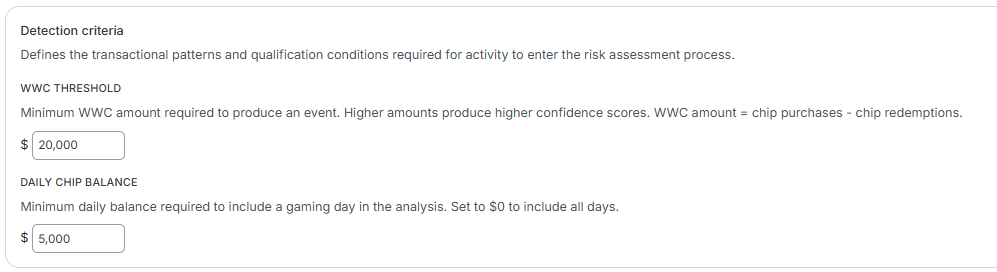
Configure the Detection Criteria - These determine which chip balances are detected. Each WWC event starts from a fixed base Confidence Score; contributing risk factors raise it and mitigating risk factors lower it. The WWC alert has two detection criteria:
WWC threshold: This is the minimum WWC amount required to produce an event. WWC amount = chip purchases − chip redemptions.
Ask yourself: At what chip balance would I consider filing a SAR? Many operators set this between $10,000 and $40,000, depending on risk tolerance and the reliability of chip inventory data. Since table game chip balances are often manually entered, higher thresholds help reduce false positives.Daily chip balance threshold: This is the minimum daily balance required to include a gaming day in the analysis, so you can exclude gaming days where the positive chip balance is below a certain amount. For example, if your MTL (Minimum Threshold Limit) is $3,000, you may choose to exclude any day where the chip balance is below that amount. If this value is set to 0, all days will be included in the analysis.
Set the Contributing Risk Factors
Contributing risk factors increase the Confidence Score. On Active alerts, a higher score can decide whether an event is escalated to an alert.
These factors help validate that the chip balance is potentially suspicious. Each has a weight.
If a factor doesn’t add confidence, clear the checkbox to the left of the factor to turn it off.
Set the Mitigating Risk Factors
Mitigating risk factors decrease the Confidence Score. On Active alerts, a lower score can keep an event below the escalation threshold, so it is not escalated to an alert.
The WWC alert includes one mitigating risk factor: Redeemed percentage of chip inventory, with a weight.
You set both the amount of total chip redemptions (greater than) and the percentage of chip inventory (or more).
This factor is commonly used to reduce the Confidence Score when a player redeems a significant portion of their chips, indicating less risk.

For more information on how contributing factors influence the Confidence Score, see the knowledge base article How is the alert score calculated.
Expected Result
Once configured, the system will record a WWC event when a player’s WWC amount is at or above the WWC threshold and meets the detection criteria. On Active alerts, the event becomes an alert if its Confidence Score reaches the Threshold score. The Confidence Score will be influenced by any contributing or mitigating risk factors turned on. If no qualifying chip balances are found, no alert will be produced.
Frequently Asked Questions
What does the WWC alert detect?
The WWC (Walks With Chips) alert identifies players who end play with a positive chip balance that exceeds your configured threshold. This may indicate suspicious behavior.
What is the difference between the WWC threshold and the Daily chip balance threshold?
The WWC threshold is the minimum WWC amount required to produce an event. The Daily chip balance threshold excludes days from analysis where the positive chip balance is below a specified amount.
How is chip balance determined?
For the WWC alert, the WWC amount is chip purchases minus chip redemptions. A player who bought more chips than they redeemed has a positive WWC amount.