Prerequisites
Permissions to View/Edit Alerts Settings required
Overview
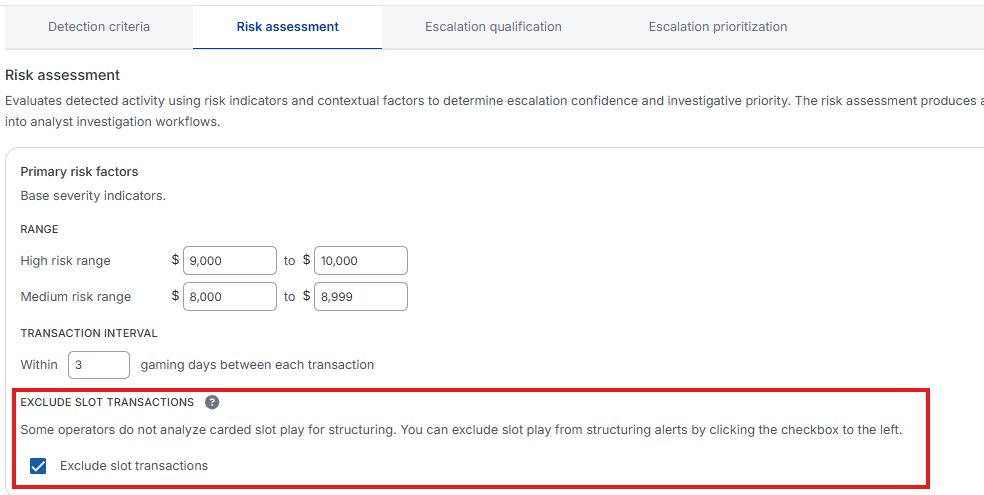
Some operators prefer not to include carded slot bill inserted transactions in their structuring analysis. To support this, Kinectify offers an Exclude slot transactions setting on the Risk assessment tab of the Structuring Inbound alert settings. When enabled, the system will ignore specific slot-related transactions—such as cash inserted into slot machines—during alert analysis. This helps reduce noise and tailor alerts to your operational preferences.
Steps to Exclude Slot Transactions
Go to Settings > Alerts (Beta), choose the property at the top of the page, then open the Structuring Inbound card.

Select the Risk assessment tab and locate Exclude slot transactions (under Primary risk factors, below Transaction interval). Select the checkbox next to Exclude slot transactions to turn the exclusion on.
Select Save. In the Verify Change window, enter a Change reason (required for the Enterprise Standard) and select Apply.
Expected Result
Once enabled, the system will automatically exclude transactions with the following attributes from Structuring Inbound Alert analysis:
Source: Cash
Target: Electronic Gaming Account or TITO
Direction: IN
Code: SBI (Slot Bill Inserted)
These Slot Bill Inserted transactions are left out of the Structuring Inbound analysis entirely, so they do not count toward the alert’s totals, suspicious days or supporting transactions. Other cash transactions to the same targets (Code: Cash In) are still included.